
Downloading the wrong rollback tool can permanently damage your device — here’s how to find trusted rollback tools safely.
When a device update goes wrong, many users search for a quick fix and end up downloading unsafe rollback tools from random sites. That is risky because rollback and recovery software can affect firmware, boot settings, system files, and device stability, so using the wrong tool can make the problem worse instead of better.
The safer path is to look for trusted rollback tools made by the device manufacturer, reputable recovery software vendors, or widely recognized IT providers with clear documentation and support. A good rollback tool should have transparent compatibility details, recovery instructions, backup advice, and a clear restore method rather than vague promises or suspicious downloads.
What Are Rollback Tools?
Rollback tools are software or built-in recovery utilities that help return a device, operating system, app environment, or firmware state to an earlier working version after an update, configuration change, or failure. Some rollback tools use snapshots, some restore from saved images, and others rely on manufacturer firmware recovery procedures.
This matters because “rollback” does not always mean the same thing across devices. On a Windows PC, rollback may mean restoring the system to a previous restore point or snapshot, while on a hardware security module or embedded device, it may refer to switching back to the last stored firmware version.
| Main Point | Explanation |
|---|---|
| Rollback tools restore an earlier state | They help reverse updates or harmful changes |
| Not all rollback methods are the same | Some use snapshots, some use firmware reversion |
| Device type matters | A PC, phone, or enterprise device may need different recovery methods |
Why Trust Matters
Rollback tools operate at a sensitive level of the device, which means an unsafe or fake tool can corrupt data, break boot processes, or install malware. Microsoft’s recovery guidance focuses on built-in backup, restore, and recovery methods, which reflects the general safety rule that trusted recovery paths should come from official or well-documented sources whenever possible.
The same idea appears in firmware rollback documentation from security-focused vendors: before performing firmware rollback, users are told to confirm environment stability and follow strict documented steps, which shows how high the risk can be when rollback is handled incorrectly. If the tool source is unclear, the download page looks suspicious, or the instructions are vague, that is a major warning sign.
| Trust Factor | Why It Matters |
|---|---|
| Official source | Reduces malware and compatibility risk |
| Clear documentation | Shows the tool is meant for real recovery use |
| Known vendor reputation | Trusted brands are more likely to support recovery safely |
| Compatibility details | Prevents flashing or restoring the wrong file |
Signs of a Trusted Rollback Tool

A trusted rollback tool usually has a few clear qualities. First, it comes from an official manufacturer page, a reputable software company, or a documented enterprise support source. Second, it explains exactly what it does, such as snapshot rollback, reboot-to-restore recovery, firmware rollback, or image restore, instead of using vague marketing claims.
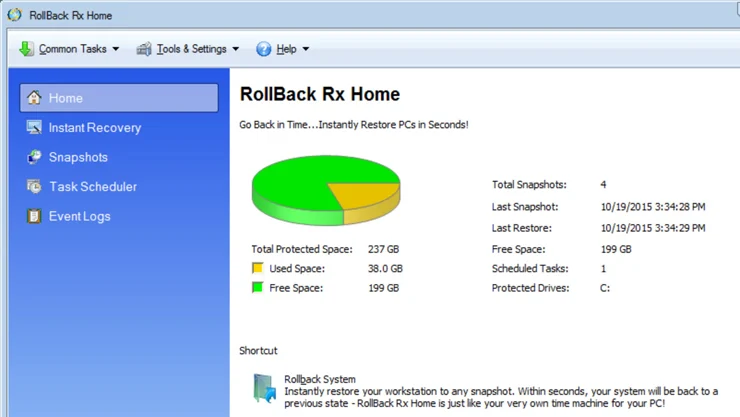
Third, trusted tools clearly list supported systems and steps. For example, Horizon DataSys says RollBack Rx Professional supports Windows 11, 10, 8, and 7 and describes instant snapshots and disaster recovery, while Faronics describes Deep Freeze as rollback software for Windows and Mac with reboot-to-restore functionality. These specifics help users judge whether a tool is legitimate and suitable.
| Sign | What to Look For |
|---|---|
| Clear vendor identity | Real company name, support pages, product details |
| OS or device compatibility | Supported versions listed clearly |
| Documented recovery process | Step-by-step recovery instructions |
| Specific feature claims | Snapshots, restore points, firmware rollback, recovery images |
Start With Official Recovery Options
Before downloading any third-party rollback tool, check whether the device already has an official recovery option. Windows includes built-in backup, restore, and recovery tools, and Microsoft documents several supported recovery paths such as backups and restore workflows. ITPro also notes that Windows recovery can include System Restore, previous build rollback, system image recovery, reset options, and reboot-to-restore approaches.
For enterprise or secure hardware, official firmware rollback may be built into the vendor’s management tools. Thales, for example, documents firmware rollback through its own management console and clearly explains prerequisites, slot selection, and confirmation steps before rollback begins. This is the safest model to follow: always start with the device maker’s documented route before using outside tools.
Best Types of Rollback Tools
Trusted rollback tools usually fall into a few main categories depending on the device and recovery need. Snapshot-based rollback tools save system states and let you return to a previous working point quickly. Reboot-to-restore tools reset a machine back to a known baseline after restart, which is popular in schools, labs, and managed environments.
Another category is backup and restore tools, which are central to safe rollback and continuity planning, according to app rollback guidance discussing backup-and-restore tools as essential for integrity and availability during rollback and recovery. Firmware rollback tools, meanwhile, are more specialized and should be used only when you have exact model compatibility and official guidance.

How to Verify a Tool Before Downloading
The safest method is to verify the source, the file, and the compatibility. First, confirm the download page belongs to the manufacturer or a legitimate software company with support documentation. Second, make sure the tool is specifically meant for your operating system, hardware model, or recovery scenario.
Third, read the recovery steps before downloading anything. Trusted documentation usually explains prerequisites such as power stability, backups, recovery points, or supported rollback paths; for example, Thales explicitly requires power protection and explains how the rollback slot system works before users run the rollback command. If a tool has no instructions, no compatibility notes, and no vendor support page, avoid it.
| Verification Step | Why It Helps |
|---|---|
| Check official domain | Confirms source legitimacy |
| Review compatibility notes | Avoids device mismatch |
| Read vendor documentation | Shows safe usage steps |
| Look for support/contact info | Trusted vendors provide support channels |
Tools Often Mentioned for Rollback Recovery
Some rollback tools are commonly referenced in system recovery discussions. Horizon DataSys promotes RollBack Rx Professional as a Windows system restore and snapshot solution with instant restore and disaster recovery features. Faronics promotes Deep Freeze as reboot-to-restore rollback software for Windows and Mac that restores devices to a predefined state with each restart.
For Windows users, built-in recovery tools remain important because they are officially documented and integrated into the system. For firmware-level device recovery, users should prefer manufacturer-specific flashing or rollback processes rather than generic third-party tools, because firmware recovery is highly model-specific and mistakes can cause serious failures.

Red Flags to Avoid
A dangerous rollback tool often reveals itself through poor trust signals. If the site looks copied, pushes aggressive ads, offers “universal firmware fixes,” or does not list exact supported models, you should be cautious. Firmware rollback is rarely universal, and official documentation tends to be precise because compatibility mistakes are serious.
Another warning sign is when a tool asks you to disable security, skip backups, or ignore the official recovery path. Safe rollback guidance emphasizes controlled recovery, not shortcuts. If the site cannot explain what the tool changes, do not use it.
Back Up Before Any Rollback
A rollback should not be your first action before creating a backup when possible. Microsoft’s support emphasizes backup and recovery options, which reflects a core safety rule: protect data before trying to restore the system. Backup-and-restore tools are also highlighted as essential to continuity and data integrity in rollback planning.
Even a trusted rollback tool can lead to data loss if the process fails, if snapshots are outdated, or if the restore point does not include your latest files. The safest habit is to back up important data, confirm recovery media or restore points exist, and only then begin rollback.

Device-Specific Recovery Matters
The rollback method should match the type of device you are trying to recover. A Windows PC can often use System Restore, system images, or snapshot-based rollback tools. A managed public-use system might be better served by reboot-to-restore software such as Deep Freeze.
Firmware-level recovery for hardware devices, network equipment, or security devices is more specialized. Thales shows that even firmware rollback for a hardware security module follows a strict command-based process and version chain, while forums like XDA show that phone flashing and fastboot firmware tools are usually tied to exact model, drivers, and firmware package requirements. That means the “best” tool depends heavily on the device category.
How to Choose the Right Tool
Choose the tool based on three things: trust, compatibility, and recovery method. If you only need to reverse a recent Windows problem, built-in recovery or a well-known snapshot tool may be enough. If the issue is firmware corruption or failed flashing on a device, the priority should be official model-specific guidance.

The right question is not “What is the most powerful rollback tool?” but “What is the safest trusted rollback path for my exact device and issue?”. That mindset reduces the risk of making recovery worse.
| Decision Factor | Best Question to Ask |
|---|---|
| Trust | Is this from an official or established source? |
| Compatibility | Does it support my exact OS, model, or version? |
| Recovery method | Is it snapshot, restore point, image, or firmware rollback? |
| Risk level | Could a failed rollback brick the device? |
FAQs
What is a rollback tool for device recovery?
A rollback tool helps return a device or system to an earlier working state after an update, failure, or harmful change.
Are third-party rollback tools safe?
Some are safe, but only when they come from reputable vendors with clear compatibility and documentation; random downloads are risky.
Should I use official recovery tools first?
Yes, official recovery options are usually the safest starting point because they are documented for your device or operating system.
Can firmware rollback damage a device?
Yes, if the wrong firmware or rollback process is used, it can fail or make the device unusable.
Do I need a backup before rollback?
Yes, backing up important data before rollback is a safer practice and is supported by official recovery guidance.
What are trusted examples of rollback tools?
Examples commonly referenced in recovery discussions include Windows recovery tools, RollBack Rx Professional, and Deep Freeze, while firmware rollback should usually rely on vendor-specific methods.
Conclusion
Finding trusted rollback tools for device recovery is not just about fixing a problem — it’s about doing it safely and correctly. Using the wrong tool can lead to data loss, system damage, or even permanent device failure, which is why choosing trusted rollback tools is essential.
The best approach is to always start with official recovery options, verify the source of any tool, and ensure compatibility with your specific device. Whether you’re using built-in system recovery, snapshot tools, or firmware rollback methods, following proper guidelines can save time and prevent serious risks.
In 2026, as devices become more advanced, recovery processes also require more care and awareness. By focusing on safe rollback tools, proper backups, and verified methods, you can recover your device confidently without creating bigger issues.
👉 Always remember: the safest rollback is the one that is trusted, documented, and carefully executed.